Is SkinsMonkey Legit? How a Trade Bot Prices Your Skins (and the API-Key Scam)
SkinsMonkey is a real, registered trading site, but it isn't a place to turn skins into cash. Its footer names Virtual Asset Empire Ltd, registration HE 412509, with an office in Nicosia, Cyprus. Its own help centre says plainly that you "can not withdraw balance" from your account; you can only spend it on the site. That makes it a trade bot: you swap skins, or skins plus topped-up balance, for skins from its stock. Most "SkinsMonkey scam" stories we've read online describe a different crime, the trade-redirection or "API-key" scam, which works on any bot site once your Steam account is compromised.
Use it if you want to swap an AK for an AWP in ten minutes and accept the bot's prices. Skip it if you want money in a bank account, or if you want the most value for a skin. On 13 October 2026 the bot's cheapest Field-Tested AK-47 | Redline cost $39.22 in site balance, while the lowest tradable copy on Skinport was $25.93 in cash. The rest of this page shows where that gap comes from and how to check a trade before you confirm it. Every site fact was re-read on 13 October 2026.
How SkinsMonkey works: a trade bot with no cash-out
You sign in through Steam, and the site reads your inventory. To trade, it lists four requirements: a public Steam profile and inventory, Steam level 2 or higher, your trade URL, and an active Steam Guard Mobile Authenticator. In the Trade Skins tab, the left panel holds what you offer and the right panel shows the bot's stock. Pick items on both sides, and the site works out the difference. Its help article on timing says the trade itself usually finishes within about 10 minutes, without guaranteeing it.
"Selling" here means trading your skin for SkinsMonkey Balance, which the help centre calls "our internal currency". That balance buys skins from the bot and nothing else. There's a marketing page titled "Sell CS2 Skins for Real Money" that promises a fast cashout, and it contradicts the help article. We take the help article as the operative rule because it's the one that describes the actual selling steps. If the site adds a withdrawal method later, its help centre is where it will appear.
Trade-locked items add one more wrinkle. If you take a skin that's still on Valve's trade hold, it isn't sent to Steam straight away; the site reserves it in a "Backpack" until the lock ends. Since Valve's Trade Protection arrived on 15 July 2025, any CS2 trade can be reversed for 7 days, so short holds are now normal on every third-party site, not only this one.
The spread: what one Redline costs in four places
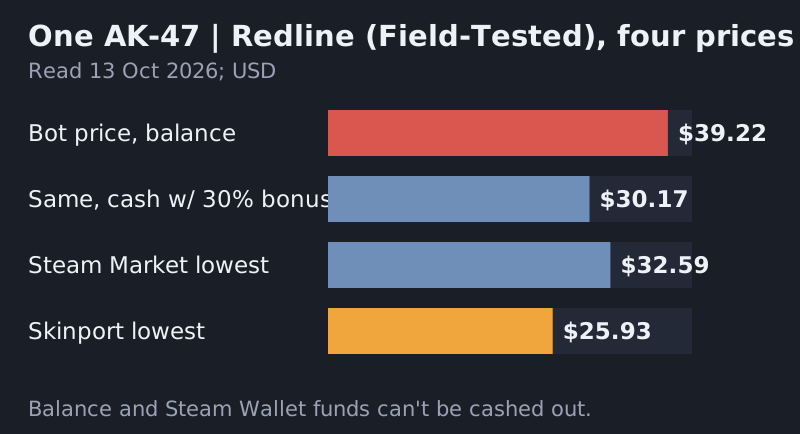
The bot publishes no fee. Instead, its margin lives in the prices it sets on each side of a trade. We can see one side without signing in: the price of a skin in its stock. On 13 October 2026 the cheapest Field-Tested AK-47 | Redline it held was $39.22, with 107 copies in stock. The Steam Community Market's lowest listing was $32.59. Skinport's lowest tradable listing was $25.93.
Those numbers aren't paid in the same money, and that matters. The bot's price is in site balance, Steam's is in Steam Wallet funds, and Skinport's is in cash. Balance and wallet funds are both stuck inside their platforms, so they trade at a premium to real dollars. The other side of the spread, what the bot credits for your skin, only shows to a signed-in user with the item in their inventory, so we didn't measure it. Before trading, put the bot's offer for your skin next to the lowest listing for the same skin on a cash market, on the same day. The gap between the two is what the swap really costs you.
The deposit bonus and why it isn't free money
The deposit help article ends with a cheerful note: when you top up, the site adds 30% of the amount as extra balance. Its homepage advertised a 35% deposit bonus for new users on the same day, so check which rate the payment window applies. The site says it charges no commission on deposits, though your payment provider may. At 30%, $30 of card money becomes $39 of balance. On our Redline example, that's $30.17 of real money for a skin that the bot prices at $39.22, or $29.05 at 35%.
That's cheaper than Steam's $32.59 in wallet funds, but it's still $3.12 to $4.24 above Skinport's $25.93 in cash, and the balance can't come back out. The bonus is best read as a discount on the bot's own price list, not as money added to your pocket. It pays off only if you were going to spend the whole top-up on the bot anyway. If a trade fails or you change your mind, the refund article lists three cases where it will refund: items not received, deposited funds not used, or a fraudulent transaction. You request it through live chat with the transaction ID.
The freebies work the same way. A one-time bonus code returns 5% of a trade's value as balance, capped at $5 on a $100 trade; the Free Tasks pay balance once, after you've traded $3 worth of items; and the raffles in the Freebies tab pay prizes. None of it is cash.
The Steam API-key scam, step by step, and how to check your key
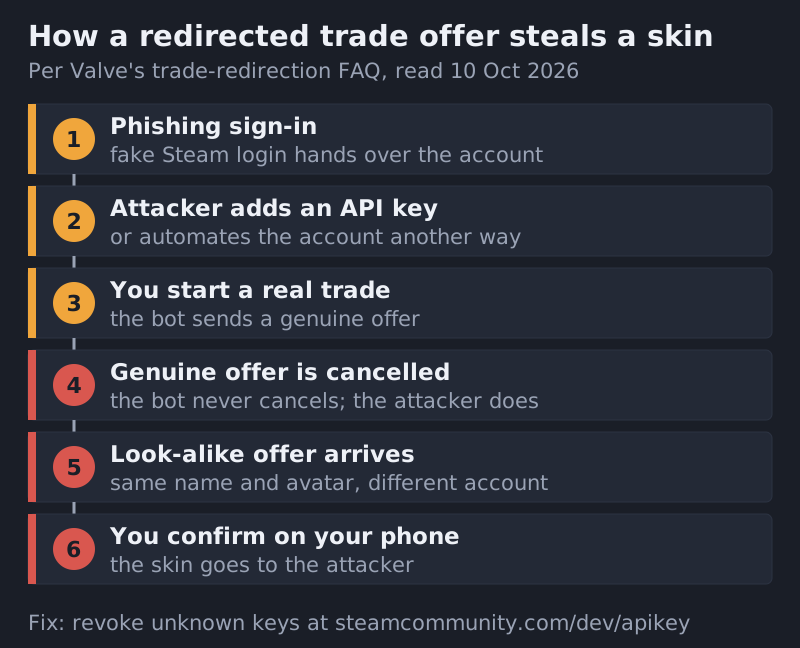
Valve describes the mechanism in its support FAQ titled "Scam: Trade Redirection". A scammer who has already taken over your account waits for you to trade with a site you trust. They cancel that trade and send an identical-looking one from an impersonation account they control, hoping you confirm it on your phone without reading the details. People call it the "API scam" because the attacker often creates a Steam Web API key on your account to watch and cancel offers automatically. Valve adds that the key isn't strictly needed: anyone with access to your account or computer can automate the same steps.
The site's help centre gives the bot-side tell: its bots don't cancel trades and don't send a second offer. If the first offer is cancelled and a near-copy arrives, don't accept it. The site says it can't return items lost this way, because it never received them. Run these checks before every bot trade:
- Revoke unknown keys. Open steamcommunity.com/dev/apikey while signed in. A key you didn't create means someone else has had access; revoke it, then change your Steam and email passwords.
- Read the phone confirmation. Valve's FAQ says the Steam Mobile confirmation shows everything you need to spot a redirected trade. Check the partner account and the items, every time.
- Check the bot's profile. The site says its bots sit in its Steam group (steamcommunity.com/groups/skinsmonkeybots), show as offline, are usually level 10 or higher and carry badges. Scam copies tend to be level 0 with empty profiles.
- Type the address. The site warns that look-alike domains impersonate it in search results. Sign in from a typed URL, and never type your Steam password into a pop-up on a third-party page.
If you've already confirmed a redirected trade, you have 7 days to reverse it from your Steam trade history. The help article warns that reversing undoes every trade from those 7 days, legitimate ones included. It also says your account is then blocked for 30 days, and Steam's Trade Protection FAQ confirms it: the account that reverses can't trade or use the Market for 30 days.
Fact table: what the site says, and where
| Question | Answer | Source |
|---|---|---|
| Who runs it? | Virtual Asset Empire Ltd, HE 412509, Nicosia, Cyprus | Site footer |
| Can balance be withdrawn? | No; spend it on the site only | Help: how to sell skins |
| Deposit bonus | 30% per the deposit help article; homepage showed 35% for new users | Help: deposit funds; homepage |
| Deposit commission | None from the site; provider may charge | Help: payments |
| Trade time | Usually under 10 minutes, not guaranteed | Help: trade timing |
| Reversal window | 7 days (Valve, from 15 Jul 2025) | Valve; site help |
| Refunds | Items not received, unused deposit, fraud | Help: refunds |
The table is deliberately narrow. We left out review-site scores and traffic figures because we couldn't verify them on the day, and we didn't list a fee because the site publishes none. If any of these rows changes, the help article named in the third column is where to check.
When a trade bot makes sense and when it doesn't
A bot is the fastest way to turn one skin into a different skin without listing anything or waiting for a buyer. That's worth paying for when the swap is small, the item is common and your time matters more than a few dollars. It makes less sense for valuable items, rare floats or patterns the bot won't price fairly, and any situation where the end goal is cash.
If you'd still rather swap through a bot, get a same-day quote for the same skin from more than one. Tradeit and Skinswap are two others to compare against; take the best number, not the first one. If the goal is selling for money, a peer-to-peer market with a published fee is the better tool: DMarket lists a 2% sell fee for most CS2 items, Skinport takes 8% and CSFloat 2% plus a withdrawal fee. Selling that $25.93 Redline on Skinport would leave about $23.85 after the 8% fee, which Skinport rounds up. Our marketplace audit costs the whole field, and the guide to selling CS2 skins covers the payout side.
Edge cases
- Trade-locked skins: you can take them, but they wait in the Backpack until the lock lifts.
- Steam level 0 or 1: the site won't trade with you until your account reaches level 2.
- Private inventory: it has to be public for the site to read it.
- Second offer after a cancel: treat it as a scam, every time. The site states its bots never do this.
- Wanting Steam credit instead: compare against the Steam Market first, using our Steam Market vs third-party breakdown.
Itemized questions
Is SkinsMonkey legit or a scam?
Can you cash out on SkinsMonkey?
Does SkinsMonkey have fees?
Why did SkinsMonkey take my skins?
What is the Steam API key scam?
Balance this against the field: the best ecommerce website builders, ranked, or the marketplace audit.